Sunday, January 16, 2011

Moovida Core media player


Immersed Media Center view

Two big changes have landed since our last, albeit acerbic, look at the player: a new ‘theme’ and the introduction of ‘Moovida Immersed’ – a beautiful 3D interface for browsing your video library.


Having ditched its buff gray and familiar Banshee layout for something a bit different Moovida has moved away from looking like nothing more than ‘Banshee for Windows’. The players controls have been moved to the bottom of the app window, a ‘genre’ pane has wiggled into the filter pane and a deadly black colour scheme tries to exude ‘slickness’ but, in all honestly, just looks naff.


The gold is in the ‘Moovida Immersed’ view. This super slick 3D animated view runs full screen and is designed to be used with an apple remote (of all things), although navigation with a keyboard still works if you’re wanting a quick play around. The screenshot below doesn’t quite capture just how fluid the interface is when browsing – if you have Windows knocking about on a partition I highly suggest giving Moovida a whirl.


Moovida is currently in Beta for Windows. Download from moovida.com

Filesystem Hierarchy Standard

The Filesystem Hierarchy Standard (FHS) defines the main directories and their contents in Linux operating systems. For the most part, it is a formalization and extension of the traditional BSD filesystem hierarchy.


Directory structure

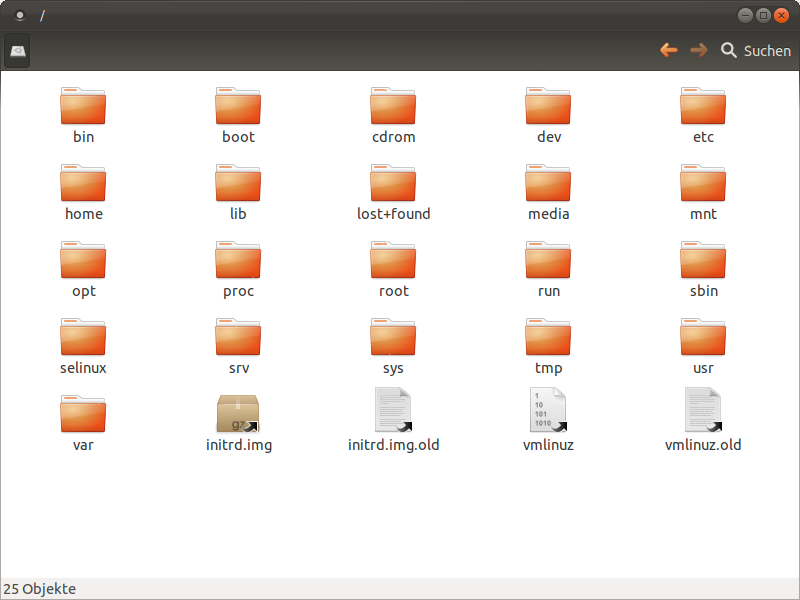
In the FHS all files and directories appear under the root directory "/", even if they are stored on different physical devices. Note however that some of these directories may or may not be present on a Unix system depending on whether certain subsystems, such as the X Window System, are installed.
The majority of these directories exist in all UNIX operating systems and are generally used in much the same way; however, the descriptions here are those used specifically for the FHS, and are not considered authoritative for platforms other than Linux.


Directory Description
/ Primary hierarchy root and root directory of the entire file system hierarchy.
/bin/ Essential command binaries that need to be available in single user mode; for all users, e.g., cat, ls, cp.
/boot/ Boot loader files, e.g., kernels, initrd; often a separate partition
/dev/ Essential devices, e.g., /dev/null.
/etc/ Host-specific system-wide configuration files
 
There has been controversy over the meaning of the name, but in early versions of the UNIX Implementation Document from Bell labs, the section for /etc is clearly commented as etcetra directory, as this directory historically held everything that did not belong elsewhere (though in FHS it is clearly restricted to static configuration files and may not contain binaries)Alternative meanings that have been suggested, such as "Editable Text Configuration" or "Extended Tool Chest" are almost certainlybackronyms that were introduced much later on

/etc/opt/
Configuration files for /opt/.

/etc/X11/
Configuration files for the X Window System, version 11.

/etc/sgml/
Configuration files for SGML.

/etc/xml/
Configuration files for XML.
/home/ Users' home directories, containing saved files, personal settings, etc.; normally a separate partition.
/lib/ Libraries essential for the binaries in /bin/ and /sbin/.
/media/ Mount points for removable media such as CD-ROMs (appeared in FHS-2.3).
/mnt/ Temporarily mounted filesystems.
/opt/ Optional application software packages
/proc/ Virtual filesystem documenting kernel and process status as text files, e.g., uptime, network. In Linux, corresponds to a Procfs mount.
/root/ Home directory for the root user.
/sbin/ Essential system binaries, e.g., init, ip, mount.
/srv/ Site-specific data which is served by the system.
/tmp/ Temporary files (see also /var/tmp). Often not preserved between system reboots.
/usr/ Secondary hierarchy for read-only user data; contains the majority of (multi-)user utilities and applications.

/usr/bin/
Non-essential command binaries (not needed in single user mode); for all users.

/usr/include/
Standard include files.

/usr/lib/
Libraries for the binaries in /usr/bin/ and /usr/sbin/.

/usr/sbin/
Non-essential system binaries, e.g., daemons for various network-services.

/usr/share/
Architecture-independent (shared) data.

/usr/src/
Source code, e.g., the kernel source code with its header files.

/usr/X11R6/
X Window System, Version 11, Release 6.

/usr/local/
Tertiary hierarchy for local data, specific to this host. Typically has further subdirectories, e.g., bin/, lib/, share/.
/var/
Variable files—files whose content is expected to continually change during normal operation of the system—such as logs, spool files, and temporary e-mail files. Sometimes a separate partition.

/var/cache/
Application cache data. Such data is locally generated as a result of time-consuming I/O or calculation. The application must be able to regenerate or restore the data. The cached files can be deleted without data loss

/var/lib/
State information. Persistent data modified by programs as they run, e.g., databases, packaging system metadata, etc.

/var/lock/
Lock files. Files keeping track of resources currently in use.

/var/log/
Log files. Various logs.

/var/mail/
Users' mailboxes.

/var/run/
Information about the running system since last boot, e.g., currently logged-in users and running daemons.

/var/spool/
Spool for tasks waiting to be processed, e.g., print queues and unread mail.

/var/spool/mail/
Deprecated location for users' mailboxes.

/var/tmp/
Temporary files to be preserved between reboots.

Friday, January 14, 2011

WIFI SCANNER FOR WINDOWS "INSSIDER 2" IS NOW AVAILABLE FOR LINUX!

inssider 2

inSSIDer 2 will display all Wi-Fi access points within range and display their MAC address, SSID, RSSI, Channel, Vendor, Encryption, Max Rate and Network Type. Use the filters feature to quickly sort through long lists of access points.

Great news for Linux users! inSSIDer 2, a very popular free/open source Wi-Fi network scanner for Windows Vista and Windows XP is now available for Linux


Download inSSIDer 2 for Linux (currently alpha) - includes .deb and .rpm files.

Tuesday, December 28, 2010

Anti Netcut di ubuntu

apa itu netcut ? suatu tool yang digunakan untuk menghentikan / memotong koneksi jaringan.

nah gimana cara mengatasinya supaya tool tersebut tidak di salah gunakan dan berpengaruh pada jaringan kita?

anti netcut solusinya...anti netcut di OS windows sudah hadir lebih dulu nah sekarang saatnya anti netcut untuk linux, khususnya distro ubuntu.

Saturday, December 25, 2010

Windows 8 Ready Introduced

In the event the Consumer Electronics Show (CES) in Las Vegas, United States, next month, Microsoft will demonstrate a few tablets that runs under the Windows platform. In addition, according to the report before CES, Microsoft is also likely to introduce the latest generation mermeka operating system, Windows 8.

In his speech on 5 January, Microsoft CEO Steve Ballmer will introduce a tablet such as Samsung, Dell, and others who run with the Windows platform, such as the New York Times wrote.

Firefox 4 Beta Now Supports 3D Graphics

Mozilla released the last beta for Firefox 4, the newest Internet browser, before releasing the final version. Several improvements have been made include full support to the graph of three-dimensional (3D) standards-based WebGL.

"Firefox 4 beta now supports WebGL for graphics card built-in common modern use. This makes the developers more easily create interactive 3D games, graphics are clear, and a new visual experience on the Web without depending on plug-ins from third party," said Mike Beltzner, Firefox Product Manager, in his blog, yesterday.


Friday, December 24, 2010

Install VirtualBox 4.0 (Stable) In Ubuntu, Via Repository

VirtualBox 4.0 has been released today. We've already covered what's new in VirtualBox 4.0 when the first beta came out so check out that post or the changelog for more info.

As you probably know, starting with VirtualBox 4.0 some features are now available separately, in an extension pack. Here are the step-by-step instructions on installing both VirtualBox and the Extensions Pack in Ubuntu.

SuperTuxKart 0.7 released with new engine, tracks, karts + more

It’s here, racing fans – a brand new version of iconic Linux game ‘SuperTuxKart’ is now available for download.


Subscribe in Bloglines Msn bot last visit powered by MyPagerank.Net Yahoo bot last visit powered by MyPagerank.Net
I heart FeedBurner downtime checker The Ubuntu Counter Project - user number # 31290

 
Twitter Delicious Facebook Digg Stumbleupon Favorites More

 
Powered by TadPole
FOG FLAMES