Thursday, June 13, 2013

How to change mac address in BackTrack 5 (R3, fake mac)

How To Change Mac Address In BackTrack 5 R3

1.Open Terminal.
2.In terminal, type ifconfig eth0 down.

3.The above command is used for disabling the eth0 interface.
4.Now change the mac address by using a simple command in backtrack.

macchanger --mac 00:55:44:33:22:11 eth0.

5.You change your mac address to any number by using the following command.
6.Now configure the eth0 by a command
ifcofig eth0 up

Tutorial Wifi Cracker

This tutorial is for people that like to crack WEP the easy way although its not all that easy in my previous post we looked at How to Crack WiFi Network easily using Aircrack-NG for Linux OS today in this tutorial we will be cracking a WiFi network using FERN WiFi CRACKER which is a GUI (Graphical User Interface) for Aircrack-NG.Before we go into this tutorial you need to first of all  Click here to Download Fern WiFi Cracker After the Download is complete  Open FERN WiFi CRACKER using the following commmand - See more at:

Wednesday, June 12, 2013

How to Hack Facebook Accounts with Backtrack 5

Step 1 : Open set Tool in Backtrack 5 : To open it follow the step shown above .
 Step 2 : Time to set the Website Attack Vectors : Below Menu   enter your choice : 2.Website Attack Vectors and press Enter.
Step 3 : Select your Attacking Method ,Here i choose 3.Credential Harvester Attack Method.
 Step 4 : Select Attack Vectors :write  2.Site Cloner and press enter as shown in the image .
Step 5: Enter the Url: To make a clone to facebook login page I entered https://www.facebook.com and press enter .As I press enter it will automatically generate a clone page .
Step 6 : To continue the process you have to put * sign and press enter.
Step 7 : Process will continue as shown in the image above .
Step 8: Open terminal and enter ifconfig command .It will shown your ip address .Now copy the ip address
Step9 : Open Web Browser and  Paste the system ipaddress into Address bar and it will redirect to the facebook login page.Now Enter your anything to check it will work or not .

FOR EXAMPLE: Here I use

Email : h4x00r

Password:hackingDNA.com
And Press Enter . Let see what happen on the Next step .
Step 10 : In step 7 the process start you remember now when you follow step 8 and step 9,then it will come up with  all the details of Username and Password.This is how we set a trap and hack victim facebook and password only on Backtrack 5

Monday, June 10, 2013

Bypass Phone and SMS verification of Any Website

Now a days,almost most websites need sms verification which includes google, facebook,youtube and other survey websites.
First of all we should understand why SMS and Phone Verification System is Important?

* Keep More Visitors for Market
* Providing Extra Security for their Website
* Keep Spammers out
* Daily Advertisement and promotional ads daily

Rather we can able to create and Bypass gmail (facebook, youtube, other shopping sites) without SMS verification.Because gmail allow to create only few account. When you try to create more account with same mobile number, google restricted and you can't create more account.So we can create counterless gmail accounts using following steps.This method is very useful to Bypass SMS verification and useful when you need to Sign up any account and do not feel comfortable to giving your real number or if you want to create multiple account.

Lets Start Step by Step:

1) First go to this Website : Receive-Sms Online
2) Copy any one number and paste it where they are asking SMS Verification.

3) Simply come back and click the number which you have selected, check it out there is your code sent by google, youtube or whatever else.

Dockshelf 1.1.2 MacOSX

Did you ever wish your Dock could do more or handle more of your apps and files? DockShelf lets you place unlimited docks around your desktop so you never run out of space again for your commonly used files, folders and applications!We've all seen it and you've probably experienced it yourself - a Dock exploding with files and apps which has been shrunk so small you can barely see what anything is anymore.DockShelf helps you manage the clutter of the Dock by offering another form of "dock shelf" which you can place around any edge of your screen without any restrictions and has more options for customization.With DockShelf launching your favorite documents and apps is faster and more powerful because you control where your docks are positioned, how many are on screen, how they're labeled and when they're visible.

DockShelf extends the concept of the Dock with new features and abilities you've been waiting for since OS X was released.Tabs.When docks are collapsed they can be displayed as labeled tabs so you can recognize them easily as they are positioned around your screen.Workspaces.Group your docks into workspaces which can be toggled via a hot key or auto-toggled depending on which application is currently active.Auto Hiding.Docks can be set to expand only when the mouse is hovered over them and optionally show only a thin margin when collapsed to save screen real estate.Launching.Apps can be launched,quit,hidden and opened at login from DockShelf.Previews. You can get QuickLook previews on documents by hovering the mouse over an item for a moment.Never In The Way.When apps go into full screen mode DockShelf will automatically hide and to offer more control you can choose which apps DockShelf will not be displayed in from the preferences.Download file DSHF112.dmg

WireShark – Ultimate network Sniffer

Wireshark is the world's foremost network protocol analyzer, and is the de facto (and often de jure) standard across many wireshark logoindustries and educational institutions.It is used for network troubleshooting,analysis,software and communications,protocol development, and education.You can interactively browse the capture data and view summary and detail information for each packet.Wireshark has several powerful features,including a rich display filter language and the ability to view the reconstructed stream of a TCP session.Wireshark was written by networking experts around the world,and is an example of the power of open source.It runs on Windows,Linux,UNIX,and other platforms.

Wireshark can read live data from Ethernet, Token-Ring, FDDI, serial (PPP and SLIP) (if the OS on which it's running allows Wireshark to do so),802.11 wireless LAN (if the OS on which it's running allows Wireshark to do so) and ATM connections (if the OS on which it's running allows Wireshark to do so).
Wireshark was previously known as Ethereal. The name might be new, but the software is the same. Wireshark's powerful features make it the tool of choice for network troubleshooting, protocol development,and education worldwide.Download Wireshark

7 Must Have Tools For Every Hacker

Its been a while since I have posted about some hacking tools and with increasing number of emails asking me to do an  7 Must Have Tools For Every Hackerarticle on it, I finally decided to cover it up.Hacking tools are developed by some really good coders out there to ease out many complex tasks which have to be done manually and took painstakingly great deal of time and effort.All these tools provided here are free of cost,are tried hands on and are being actively developed by community,and if not,their alternatives are provided.To summarize it up, these are the 7 must have tools for every hacker out there.

1. Nmap
I think everyone has heard of this one, Nmap (Network Mapper) is a free open source utility for network exploration or security auditing. It was designed to Nmap rapidly scan large networks, although it works fine against single hosts.Many systems and network administrators also find it useful for tasks such as network inventory, managing service upgrade schedules, and monitoring host or service uptime. Nmap uses raw IP packets in novel ways to determine what hosts are available on the network, what services (application name and version) those hosts are offering, what operating systems (and OS versions) they are running, what type of packet filters/firewalls are in use,and dozens of other characteristics. It may be used to discover computers and services on a computer network, thus creating a "map" of the network.Nmap runs on most types of computers and both console and graphical versions are available. Nmap is free and open source.Can be used by beginners (-sT) or by pros alike (packet_trace). A very versatile tool, once you fully understand the results.Download Nmap

2.Nessus Remote Security Scanner
Recently went closed source, but is still essentially free. Works with a client-server framework.Nessus is the worlds Nessus Remote Security Scanner most popular vulnerability scanner used in over 75,000 organizations world-wide. Many of the worlds largest organizations are realizing significant cost savings by using Nessus to audit business-critical enterprise devices and applications.Download Nessus

3.Wireshark
Wireshark is a GTK+-based  Wiresharknetwork protocol analyzer, or sniffer, that lets you capture and interactively browse the contents of network frames. The goal of the project is to create a commercial-quality analyzer for Unix and to give Wireshark features that are missing from closed-source sniffers. Works great on both Linux and Windows (with a GUI), easy to use and can reconstruct TCP/IP Streams!.Download Wireshark 


4.Cain and Abel
The swiss knife of hacking tools..Cain & Abel is a password recovery tool for Microsoft Operating Systems. It allows easy recovery of various kind of passwords by sniffing the network, cracking encrypted passwords using Dictionary, Brute-Force and Cryptanalysis attacks, recording VoIP conversations, decoding scrambled passwords, revealing password boxes, uncovering cached passwords and analyzing routing protocols.The program does not exploit any software vulnerabilities or bugs that could not be fixed with little effort.
Download Cain and Abel

5.Kismet
Kismet is an 802.11 layer2 wireless network detector, sniffer, and intrusion detection system. Kismet will work with  Kismetany wireless card which supports raw monitoring (rfmon) mode, and can sniff 802.11b, 802.11a, and 802.11g traffic. A good wireless tool as long as your card supports rfmon.Download Kismet 

6.NetStumbler
Yes a decent wireless tool for Windows! Sadly not as powerful as it’s Linux counterparts, but it’s easy to use and has a NetStumbler nice interface, good for the basics of war-driving. NetStumbler is a tool for Windows that allows you to detect Wireless Local Area Networks (WLANs) using 802.11b, 802.11a and 802.11g. It has many uses:

Verify that your network is set up the way you intended.
Find locations with poor coverage in your WLAN.
Detect other networks that may be causing interference on your network.Detect unauthorized rogue access points in your workplace.
Help aim directional antennas for long-haul WLAN links.Use it recreationally for WarDriving.Download NetStumbler

7.SuperScan
Powerful TCP port scanner, pinger, resolver. SuperScan 4 is an update of the highly popular Windows port scanning tool, SuperScan. If you need an alternative for nmap on Windows with a decent interface, I suggest you check this out, it’s pretty nice.Download Superscan

Alternatively, you can try Angry IP Scanner which is a pretty good replacement for it.


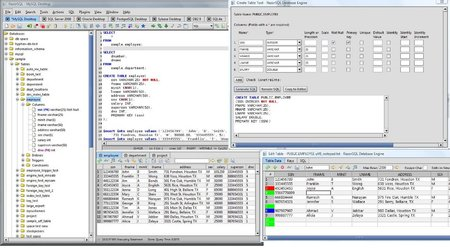
Richardson Software RazorSQL 6.1.0 (x86/x64) MacOSX


Subscribe in Bloglines Msn bot last visit powered by MyPagerank.Net Yahoo bot last visit powered by MyPagerank.Net
I heart FeedBurner downtime checker The Ubuntu Counter Project - user number # 31290

 
Twitter Delicious Facebook Digg Stumbleupon Favorites More

 
Powered by TadPole
FOG FLAMES