Wednesday, December 10, 2008

Tscrack

Tscrack was one of the first Remote Desktop password-cracking tools to be released. While it is nothing more than a brute force password guesser that throws a predetermined list of passwords at a Remote Desktop logon session, it can test over 20 passwords a minute, with several different options available during the testing. In addition, tscrack can use other information, such as the domain name, which could help in cracking the password. To execute this program against the target of the RDP file. TScrack is a dictionary based (rather than bruteforce) password cracker for Microsoft Windows Terminal Services (RDP).


tscrack -t -w passwords.txt -l administrator -D mshome.net 192.168.0.101


Remote Assistance


Ethereal capture of Remote Assistance request


Remote Assistance is similar to the Remote Desktop, except that it allows two people to be connected to a computer at one time. Typically, a novice who needs the help of a technician will use this program. To receive help, the novice selects the Remote Assistance option from his Help page and sends the technician an email, MSN message, or file that allows the technician to connect to the computer. Unlike Remote Desktop, which is typically protected by a password, Remote Assistance does not have to be protected by a password. This can cause security problems. Unfortunately, the Remote Assistance file is nothing more than an encrypted link that is sent as plain text to the technician. Therefore, any sniffer can see the link and a hacker can potentially recreate the link and connect to the novice's computer instead of the technician. With a little social engineering, the hacker could talk the novice into giving the hacker full control and then could install a backdoor (or more) in a few minutes.

[Download]

Monday, November 17, 2008

Volume invisible on Ubuntu Desktop


I try to Posting The Simple Triks...
How to invisible Mounted Drive in Ubuntu Desktop.....


Open Terminal and and write: " gconf-editor "


And we will see Konfiguration Editor Menu

and Go to " APP --> Natilus --> Desktop "


Uncheck Volume_invisible

Friday, September 12, 2008

Google Chrome (BETA) for Windows

Google Chrome (BETA) for Windows
Google Chrome is a browser that combines a minimal design with sophisticated technology to make the web faster, safer, and easier.


Google says Chrome will provide more speed, stability and security for Web users, and combined with Google Gears, which allows users to take Web-based applications offline.

Chrome also is fuelling talk about where Google itself is headed. Some say Google's effort may be as much proof-of-concept as future product in terms of showing Microsoft, Mozilla, Apple and others what can be done, and prodding them to upgrade their own browser software.

Still others believe there will eventually be a showdown with Microsoft and a Google end-run at building an enterprise computing business. Clearly Chrome could not have been timed better to coincide with Microsoft's Beta 2 release of Internet Explorer 8, a juxtaposition that Google explained as a inadvertent leak of a comic book trumpeting the browser's virtues.

"Google has generated a lot of excitement," says Forrester analyst Sheri McLeish." But it is a beta and from an enterprise perspective it is not ready for serious consideration as a replacement for IE."

Download Google Chrome

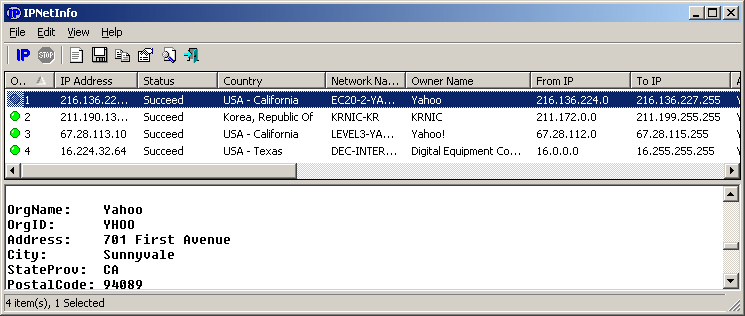
IPNetInfo v1.16 - Retrieves IP Address Information

IPNetInfo is a small utility that allows you to easily find all available information about an IP address: The owner of the IP address, the country/state name, IP addresses range, contact information (address, phone, fax, and email), and more.

This utility can be very useful for finding the origin of unsolicited mail. You can simply copy the message headers from your email software and paste them into IPNetInfo utility. IPNetInfo automatically extracts all IP addresses from the message headers, and displays the information about these IP addresses.


How does it work ?

The IP address information is retrieved by sending a request to the whois server of ARIN. If ARIN doesn't maintain the information about the requested IP address, a second request is sent to the whois server of RIPE, APNIC, LACNIC or AfriNIC.
After the IP address information is retrieved, IPNetInfo analyzes the Whois record and displays it in a table.


Wednesday, September 10, 2008

Acunetix Web Vulnerability Scanner

Acunetix Web Vulnerability Scanner (WVS) is an automated web application security testing tool that audits your web applications by checking for exploitable hacking vulnerabilities. Automated scans may be supplemented and cross-checked with the variety of manual tools to allow for comprehensive web site and web application penetration testing.


if web applications are not secure, then your entire database of sensitive information is at serious risk. Why?

  • Websites and related web applications must be available 24 x 7 to provide the required service to customers, employees, suppliers and other stakeholders
  • Firewalls and SSL provide no protection against web application hacking, simply because access to the website has to be made public
  • Web applications often have direct access to backend data such as customer databases and, hence, control valuable data and are much more difficult to secure
  • Custom applications are more susceptible to attack because they involve a lesser degree of testing than off-the-shelf software
  • Hackers prefer gaining access to the sensitive data because of the immense pay-offs in selling the data.


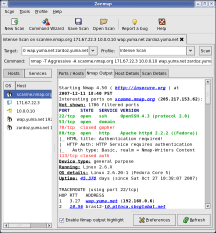
Zenmap

Zenmap is the official Nmap Security Scanner GUI. It is a multi-platform (Linux, Windows, Mac OS X, BSD, etc.) free and open source application which aims to make Nmap easy for beginners to use while providing advanced features for experienced Nmap users. Frequently used scans can be saved as profiles to make them easy to run repeatedly. A command creator allows interactive creation of Nmap command lines. Scan results can be saved and viewed later. Saved scan results can be compared with one another to see how they differ. The results of recent scans are stored in a searchable database.


You can download Zenmap (often packaged with Nmap itself) from the Nmap download page. Zenmap is quite intuitive, but you can learn more about using it from the Zenmap User's Guide or check out the Zenmap man page for some quick reference information. 


Subscribe in Bloglines Msn bot last visit powered by MyPagerank.Net Yahoo bot last visit powered by MyPagerank.Net
I heart FeedBurner downtime checker The Ubuntu Counter Project - user number # 31290

 
Twitter Delicious Facebook Digg Stumbleupon Favorites More

 
Powered by TadPole
FOG FLAMES